Product Help
Learn about the functionality of Easy MTD.
ViewIf you're VAT registered and you record your business figures in a spreadsheet or non-compliant accounting software, Easy MTD is the perfect bridging solution for your VAT submission needs.
Learn More Try Now
Easy MTD enables you to submit VAT returns digitally to HMRC and view VAT obligations, liabilities, payments and penalties.
Learn More Try Now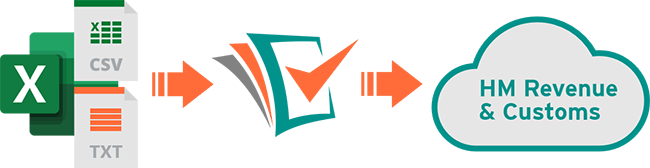
The Easy MTD interface is so simple you'll be viewing VAT data and submitting VAT returns to HMRC in minutes.
Learn More Try Now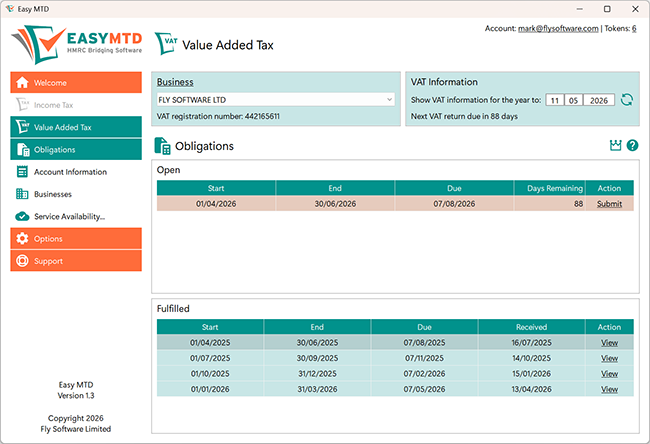

Easy MTD continues to provide the same VAT functionality as Easy MTD VAT but will also allow you to comply with Making Tax Digital for Income Tax.
A simple update is all that is required to get up and running.
Same developers, same account, same settings, same tokens, same great service.
Making Tax Digital for VAT is a HMRC service that was introduced in April 2019 to help ensure businesses get their VAT right. Under the new rules, business figures need to be kept digitally and HMRC's online VAT submission interface can no longer be used.
If you record your business figures in Excel, Google Sheets, OpenOffice Calc or any other spreadsheet, or you use accounting software that is incompatible with Making Tax Digital for VAT, bridging software, such as Easy MTD, must be used to submit VAT returns to HMRC.

Easy MTD is a HMRC-recognised Windows application for businesses and agents. It enables users to view obligations, liabilities, payments and penalties for any number of businesses, and submit VAT returns to HMRC in compliance with Making Tax Digital for VAT.
VAT figures held in an Excel (xlsx, xls, xlsm), text (txt) or comma-separated values (csv) file can be imported then submitted, meaning any business that uses a spreadsheet or non-compliant accounting software can use Easy MTD as a bridging solution. If you need to submit a nil/zero VAT return you don't even need a figures file - you just tick a checkbox!
VAT obligations, liabilities, payments and penalties can be viewed for free and submitting a VAT return costs from as little as £2+VAT.
Submit VAT returns digitally to HMRC and view VAT obligations, liabilities and payments from a single, intuitive interface.
Whether you need to submit a VAT return for your own business, or you're an agent who needs to submit for one or more clients, Easy MTD VAT is the perfect solution.
Easy MTD submits VAT figures contained in an Excel (xlsx, xls, xlsm), text (txt) or comma-separated values (csv) file.
If your spreadsheet or accounting software can export to an Excel (xlsx, xls, xlsm), text (txt) or comma-separated values (csv) file, Easy MTD can be used to submit your VAT returns.
As long as your Excel (xlsx, xls, xlsm), text (txt) or comma-separated values (csv) file contains the VAT figures required by HMRC, you can use Easy MTD to submit your VAT return.
There is no need to change the way you record your business figures. All Easy MTD needs are the VAT figures in an Excel (xlsx, xls, xlsm), text (txt) or comma-separated values (csv) file.
If necessary, your VAT figures are correctly rounded, converted to whole numbers, calculated or assumed to be zero so they conform with HMRC rules.
Easy MTD is compliant with HMRC's Making Tax Digital for VAT service and is listed on the HMRC "Find Software" web page.
View your obligations, liabilities and payments for free, and buy submission tokens from as little as £2+VAT to submit VAT returns digitally to HMRC.
When you sign up for an account, you are gifted a submission token that enables you to submit your first VAT return without cost.
Easy MTD is not an Excel addon so you don't need to own Excel, use a special spreadsheet template or be an Excel power user to submit your VAT returns.
If you have a query or stumble on a problem, the Easy MTD support team are only a support ticket away from getting the answer you need.
Easy MTD's tiny setup file and super fast installation means you're up and running in minutes.
Specify your own or a client's VAT registration number and business name.
Connect Easy MTD with HMRC for the selected business.
Specify your Easy MTD account so Easy MTD knows you have an available token.
Import VAT figures from an Excel (xlsx, xls, xlsm), text (txt) or comma-separated values (csv) file in readiness for submitting them.
Submit your own or a client's VAT return digitally to HMRC in compliance with Making Tax Digital for VAT.*
*You must have a token in your Easy MTD account before a VAT return can be submitted.
Read the illustrated step-by-step guides on how to use Easy MTD
Easy MTD VAT has been replaced by Easy MTD so it can no longer be downloaded. Instead, you'll need to download and use Easy MTD.
Easy MTD can be downloaded and used to view your obligations, liabilities, payments and penalties for FREE (we won't even ask you to sign up for anything).
Only when you need to submit a VAT return will you need to sign up for a Easy MTD account and buy a token.
If you're moving from a paper based record keeping system then take advantage of one of our Excel spreadsheet templates.
You can use these to record your sales and expenses and automatically generate the 9 box figures required by HMRC.
You need one token to submit one VAT return using Easy MTD.
Sign up for an Easy MTD account and you'll receive a complimentary token.
You can use this to submit your first VAT return for FREE!
Only one free token per company. Fly Software reserve the right to remove multiple free submission tokens assigned to the same company.
If you have a question about Easy MTD or you need assistance, please contact us and we'll do our best to get back to you promptly.

FLY SOFTWARE LIMITED is a UK software development company that was established in 2006. It creates and distributes Making Tax Digital for Income Tax and VAT bridging software while also offering a wealth of business services.
Company Number: 6526124
Copyright © 2026 Fly Software Limited. All Rights Reserved.